
D7 Lead Finder is fine for quick lists.
You choose a niche and location, export contacts, and start emailing.
But when you scale, mixed data accuracy, shallow enrichment, weak integrations, and a lot of manual work. Bounces go up. Pipelines slow down.
We’ll focus on what actually helps you get replies and meetings: verified data, useful enrichment, and workflows that plug into your stack without hacks.
TL;DR - 5 Best D7 Lead Finder Alternatives
Coldreach: Signal-driven outbound where timing matters (auto-personalized emails from live buying signals).
Leadsforge: Verified, enriched contact lists with a simple chat search + quick push to CRM/sequencer.
Apollo.io: All-in-one stack (find → enrich → sequence) with strong integrations and a Chrome extension.
UpLead: Low-bounce lists via real-time verification and a 95% accuracy guarantee.
Lusha: Phone-first prospecting (direct dials) and fast capture via Chrome extension.
Why look for D7 Lead Finder alternatives?
Inaccurate data = bounces and rework. Many emails are old or wrong, so more messages bounce, and someone has to clean lists by hand.
Thin enrichment. You often don’t get key details like firmographics, technographics, or intent, which other tools include.
Export-first workflow. You mostly download CSV/PDF lists and then cobble together the rest of the process in other tools.
Limited integrations and API depth. It’s harder to plug into CRMs or verification/outreach tools the way modern stacks expect.
Scaling issues. Daily search limits and manual exporting slow down multi-seat teams and agencies.
Few up-to-date reviews. There isn’t much recent third-party feedback, so it’s tough to evaluate quality.
Support complaints. Users report slow or limited help.
Compliance and mobile coverage gaps. Rivals lean into GDPR/CCPA and have stronger mobile numbers, especially for EMEA.
Top 5 D7 Lead Finder Alternatives for B2B Outreach
Tool | Core motion | Data & verification | Signals / intent | Outreach in-product | Integrations | Pricing model (public) | Free plan (public) | Notable drawbacks |
D7 Lead Finder | Search by keyword + location, then export | Lists from category/location; export-first | - | - | Limited public info; export-first | Plan tiers with daily searches/lists caps | - | Static lists; manual CSV workflow; caps per day |
Apollo.io | Find → enrich → sequence in one app + Chrome ext. | Large dataset (~210M+ contacts / 35M+ companies); enrichment & export credits | Filters; (no Bombora-style guarantee) | Yes: email/phone/social sequences, workflows, dialer | Salesforce, HubSpot, Outreach, Salesloft + more | Tiered; credit-based (exports/enrichment consume credits) | Free (lists 1,200 credits/year/user) | Credit math & tier complexity; setup time |
UpLead | Target with 50+ filters; verify at unlock/export | Real-time verification with 95% accuracy guarantee; 160M+ contacts / 19M+ companies | Buyer intent, technographics (27K+ techs) | No native sequencer (export/sync to tools) | CRM/API + Chrome extension | Credit-based by tier | 7-day trial (5 credits) | Credit caps; some features on higher tiers |
Lusha | Discover → live lead stream → automate; Chrome ext. | ~280M+ contacts; claims 98% email / 85% phone | Buyer signals, AI recs & AI Playlists | Engage email automation; in-tool workflows | MCP + API + CRM/engagement | Credits per reveal (email/phone) by seat tier | Free plan (credits/month; tiered) | Phone reveals are credit-heavy; tier gating |
Leadsforge | Multi-source search + waterfall enrichment; push to outreach | Markets 500M+ contacts; real-time validation; phone validation | ICP chat search; (no 3rd-party intent network) | Handoff to Salesforge sequences; CSV | Salesforce, HubSpot, Pipedrive (+ CSV/API) | $49/mo incl. 2,000 export credits; emails=1, phones=10; credits roll over | 100 free credits (promo) | Phone credit burn; strongest handoff is to Salesforge |
Coldreach | AI SDR: monitor buying signals → personalize → auto-send | Monitors ~79M+ accounts across public sources | Custom “intent” definitions, 24/7 monitoring | Signal-based emails auto-sent | Mentions Salesforce, HubSpot, Salesloft, Apollo, Slack, Gong | Pricing via demo (site doesn’t list numbers) | - | Not for bulk scraping; define signals well; pricing opaque |
Cognism | Search/enrich; strong mobile coverage, EMEA strength | Diamond Data® (phone-verified mobiles); GDPR/CCPA posture | Buyer signals (productized) | Works with engagement tools | CRM/engagement integrations | Custom/enterprise (via demo) | - | Contracted pricing; heavier process vs SMB tools |
Now, let’s get into the details.
#1. Coldreach -
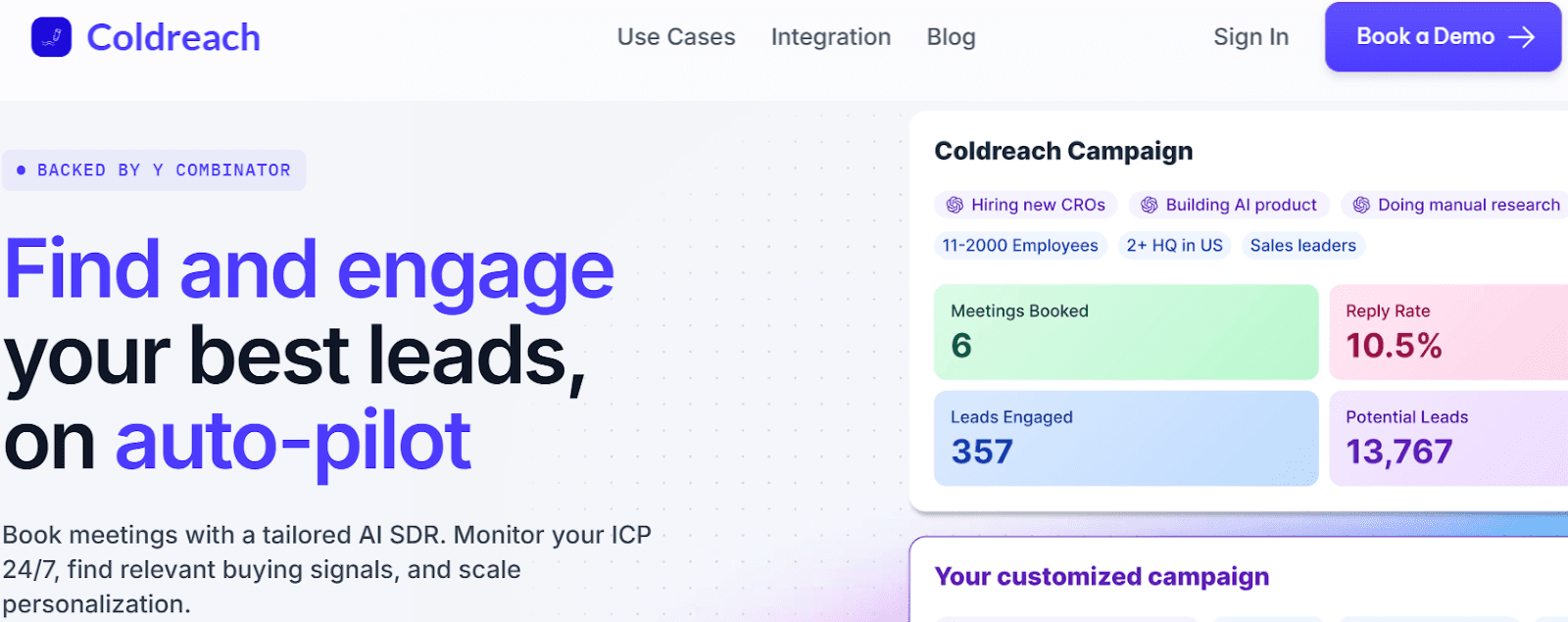
Coldreach is an AI SDR platform that watches for buying signals (like hiring, news, or site changes) on your ICP and personalizes outreach when those signals appear.
Key Features
Custom intent signals: You define what “intent” means; Coldreach monitors public sources (jobs, news, webpages, SEC 10-K, LinkedIn profiles) and flags accounts when those signals appear.
Always-on monitoring: Tracks ~79M+ companies (G2 lists 96M) and updates you when targets match your criteria.
AI sequencing tied to signals: Generates and sends personalized emails that reference the detected trigger (e.g., hiring, tech stack mention).
Campaign builder + weekly refreshed lists: Build targeted lists from your criteria; get refreshed exports each week.
Integrations & sync: Connects with Salesforce, HubSpot, Salesloft, Apollo, Slack, Gong; API options for custom workflows.
YC-backed: Y Combinator profile confirms the signal-monitoring approach.
Pricing note: Public site drives to demo; Coldreach’s own blog cites a free plan and paid plans “from $134/mo (annual).” Verify current pricing.
How Coldreach compares to D7
Stronger integration surface: Native references to major CRMs/engagement tools reduce manual CSV shuffling vs D7.
Intent-signal monitoring (jobs, news, webpages, filings, LinkedIn) + 24/7 tracking vs D7’s static list searches.
Signal-based personalization & auto-send (monitor → trigger → personalized email) vs manual export + sequencing elsewhere.
YC-backed, signal-first workflow vs export-first list building.
Coldreach Pros
Timing advantage: Finds leads when buying triggers happen (not just static business listings). Expect fewer “too early/too late” reaches than with export-first list tools.
Verification via live signals: Uses real-time public data (job posts, filings, site content) to qualify accounts, useful if D7’s exported lists feel generic.
Built-in workflow: Monitoring → signal → personalized email in one system; D7 typically requires exporting and stitching with other tools.
Less manual research: AI ties the detected signal to the message.
Fits modern stacks: site/materials reference CRM/engagement integrations.
Coldreach Cons
Not a bulk category/location scraper for quick generic lists.
Works best when you define good signals/prompts (some setup/strategy needed).
Relies on public signals by default; private/first-party usage signals need extra wiring via integrations/API.
Pricing
You can confirm current pricing in a demo.
Who should use it
Teams that want signal-driven prospecting with automated, personalized outreach, from solo founders to lean sales teams looking to book meetings without manual research.
Notable proof points
YC company profile confirming the “custom signal monitoring” approach.
G2 product page describing the AI SDR and data sources.
#2. Leadsforge
Leadsforge is a multi-source B2B contact finder that verifies and enriches data, then lets you export or push leads into your CRM or sequencer.
Key Features
Multi-source, verified data (500M+ contacts): Connects to multiple providers with waterfall enrichment (tries another source if the first fails), real-time email validation, LinkedIn URL checks, and phone number validation.
Chat-based search (describe your ICP): Natural-language prospecting that aggregates results across sources; no complex filters needed.
Integrations & sync: Direct connections referenced for Salesforce, HubSpot, Pipedrive, and push-to-sequence with Salesforge; marketing tools like Mailchimp/Marketo are mentioned in docs/blog.
Exports + ecosystem: Export to CSV or push straight into Salesforge to run outreach (no CSV shuffle).
How it compares to D7
Verified, multi-source data with waterfall enrichment (real-time checks, retries across providers) vs D7’s category/location list export.
Direct push to CRM or outreach (Salesforce/HubSpot/Pipedrive; CSV too) vs D7’s export-first workflow.
Transparent credits & pricing (e.g., $49/mo, emails=1 credit; phones=10) vs D7’s plan tiers with daily search caps
Leadsforge Pros
Huge coverage + simple “chat” search: Markets 500M+ contacts and lets you describe your ICP in plain English to get a list (no complex filters).
Waterfall enrichment + real-time checks: Pulls from multiple providers and retries missing fields to improve fill rates and reduce bounces.
Frictionless handoff to outreach/CRM: One-click push to Salesforge sequences (no CSV), plus CSV export for the rest of your stack.
Clear, low entry pricing with rollover: $49/mo includes 2,000 export credits; emails = 1 credit, phones = 10 credits; unused credits roll over / “never expire.”
Leadsforge Cons
Ecosystem tilt: The smoothest workflow is into Salesforge; teams on other sequencers may rely more on CSVs or custom wiring.
Credit burn on phones: At 10 credits per phone number, call-heavy programs can exhaust allowances quickly.
Younger product / fewer third-party reviews: Public, independent reviews are still sparse compared with long-standing vendors.
Vendor-mix dependency: Waterfall coverage/latency can vary by underlying data sources; teams should test results on their ICP before committing. (Inference based on waterfall model.)
Pricing
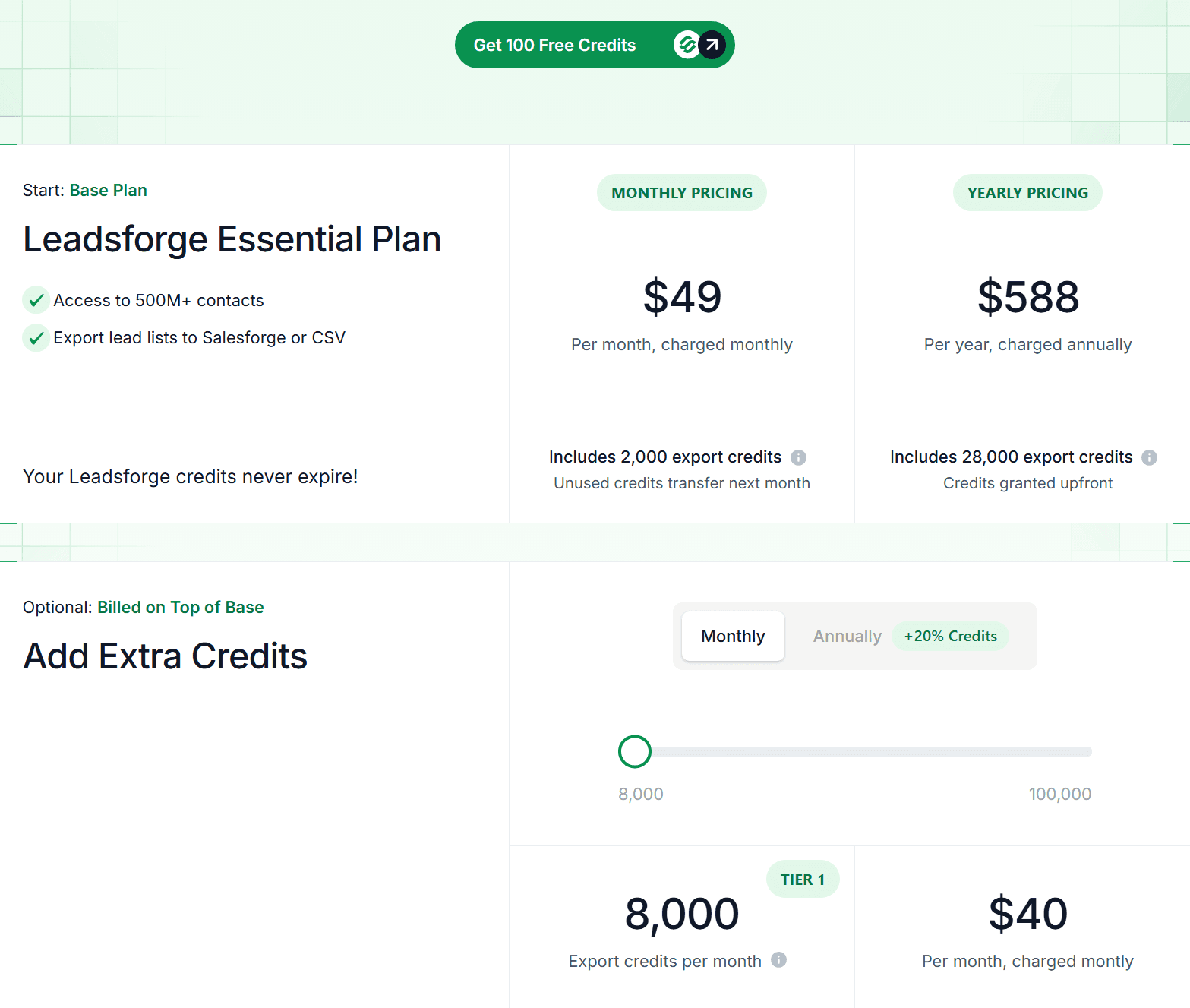
Essential plan: $49/mo (2,000 export credits) or $588/yr (28,000 credits). Emails credit: phone numbers=10 credits. Unused credits roll over; add-on credit packs are available. Free 100 credits to try.
Who should use it
Teams that want verified, enriched B2B contacts with a simple chat search, plus direct sync to CRMs and an option to push lists straight into outreach without CSV juggling.
Notable proof points
Product site detailing 500M+ contacts and waterfall enrichment with real-time validation.
Public pricing page with rollover credits and per-item credit costs.
#3. Apollo
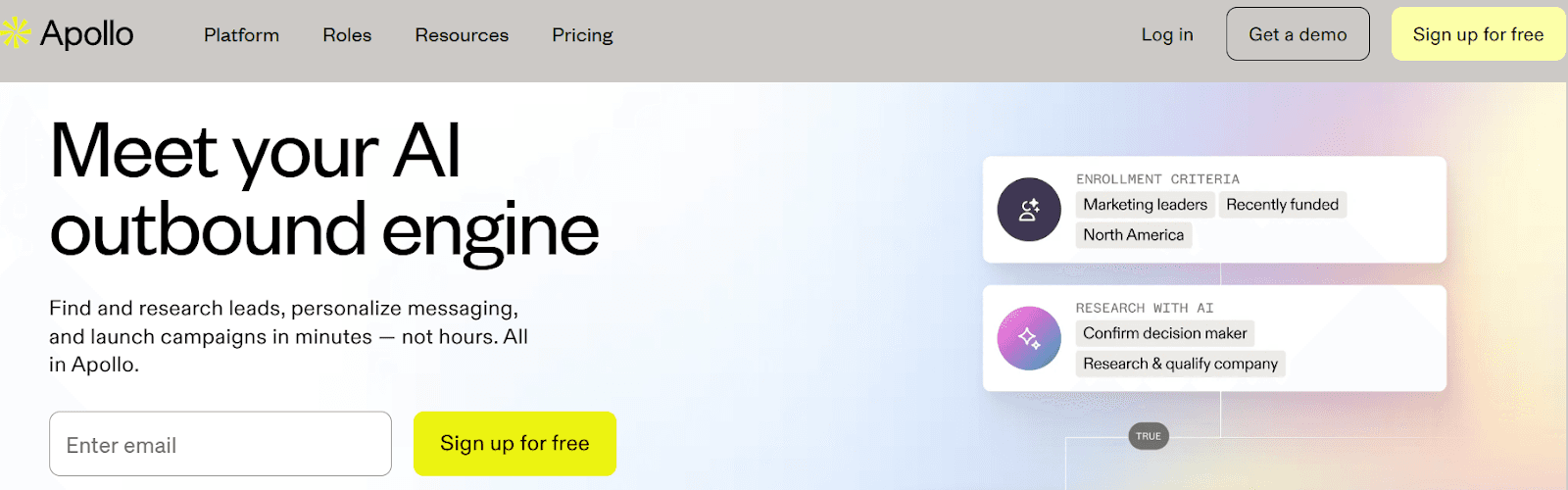
Apollo.io is a combined B2B database and sales engagement platform where you can find leads, enrich records, and run multi-channel sequences in one place.
Key Features
Large B2B dataset: Public materials cite 210M+ contacts and 35M+ companies accessible via web app and Chrome extension.
Sequences & workflows: Built-in email/phone/social sequences, rules, and automations to add/remove contacts, schedule tasks, and trigger steps.
Chrome extension: Find emails/phones from LinkedIn, Gmail, websites; use Apollo data where you work.
Enrichment & API: CSV/CRM enrichment, waterfall enrichment, and REST API for custom syncs.
Dialer & engagement tools: Native dialer and conversation features (alongside email templates, analytics, and meetings).
Integrations: Connects with Salesforce, HubSpot, Outreach, Salesloft, Marketo, SendGrid, Gmail/Outlook; API on higher tiers.
How Apollo compares to D7
Workflow: Apollo = find → enrich → sequence (all in one). D7 = search → export (work elsewhere).
Integrations: Apollo has deep CRM/engagement integrations + Chrome extension.
D7’s native integrations are limited.
Enrichment & automation: Apollo offers enrichment, rules, and automations.
D7 is mostly a list of exports with manual steps.
Data access: Apollo data is usable inside LinkedIn/Gmail via the extension; D7 is export-first.
Pricing model: Apollo uses credits (exports consume credits). D7 uses plan tiers with daily search caps.
Best fit: Choose Apollo for an integrated data+outreach stack; choose D7 for quick, basic category/location lists.
Pros
All-in-one workflow: find → enrich → multi-channel sequences (email/call/social) with rules and Workflows automation.
Big, fresh dataset: public materials cite ~210M+ contacts / 35M+ companies; accessible in-app and via Chrome extension (LinkedIn, Gmail, websites).
Chrome extension, everywhere you work: prospect on LinkedIn/Gmail/Salesforce/HubSpot; add to sequences in a few clicks.
Strong integrations: native, bi-directional sync with Salesforce/HubSpot; 50+ integrations overall.
Enrichment options: CSV/CRM/API and waterfall enrichment to improve fill rates.
Mature outreach features: dialer, templates, analytics, tasks - reduces tool sprawl.
Cons
Credit & export costs add up: exports and some enrich actions consume credits; budgeting is needed at scale.
Plan complexity/variance: allowances (mobile/export credits, workflows) vary by tier and change over time, must check the live pricing page.
Setup time: best results require configuring sequences, rules, and CRM field mappings.
One-CRM limitation at a time: you can connect only one CRM (HubSpot or Salesforce) simultaneously.
Dataset size claims vary across pages (e.g., 210M+ to 224M+/265M+ in different posts); verify for your segment/region.
Pricing
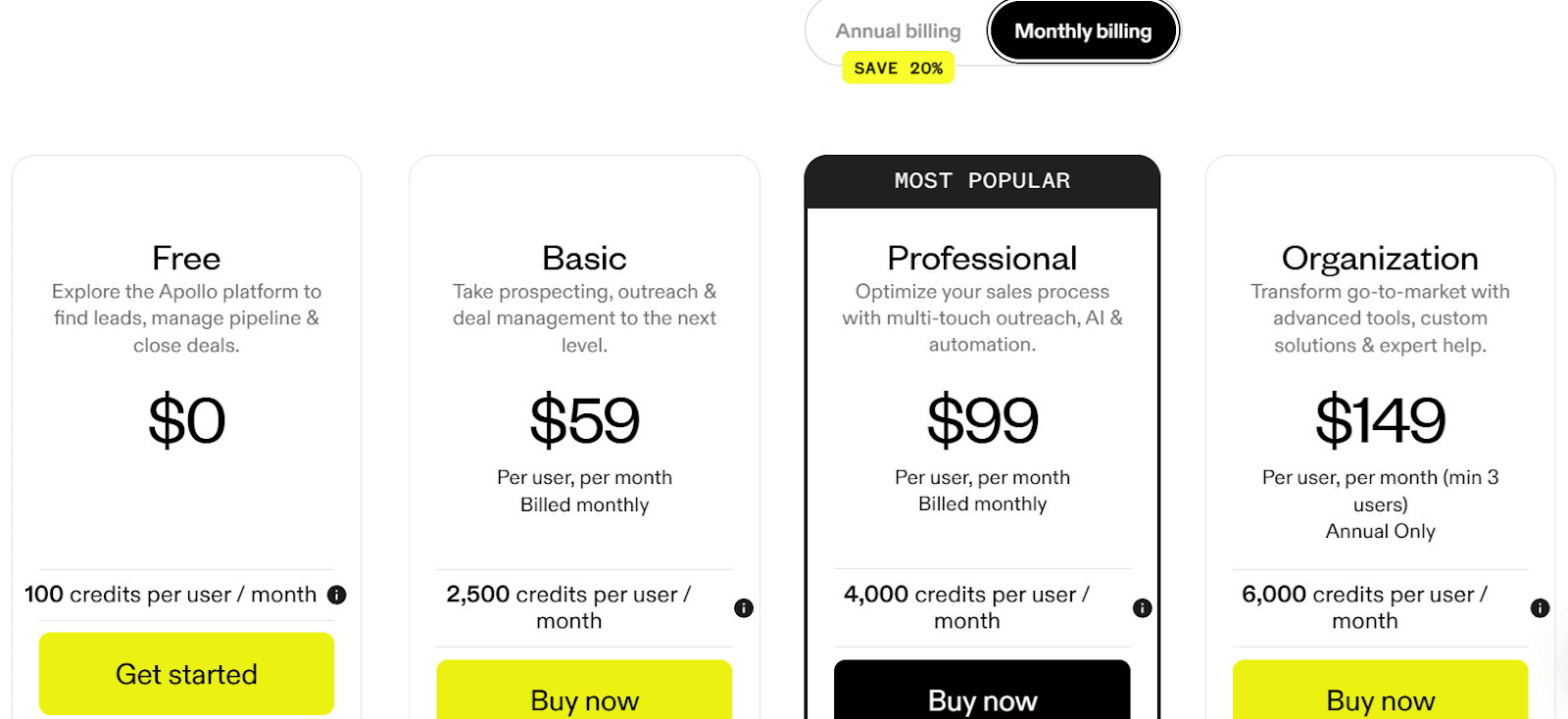
Free: Listed as $0 with 1,200 credits per user/year on Apollo’s pricing page.
Paid tiers (names and per-seat prices change): include Unlimited Email Credits governed by a Fair Use Policy. For “Unlimited,” Apollo caps usage at 10,000 credits/month for non-paying “Unlimited” accounts, and for paying accounts, the cap is the lesser of (amount paid / $0.025) or 1,000,000 credits/year per account.
Credit types & usage: Email/phone discovery and enrichment consume credits (including CSV/CRM/API enrichment). Exports also consume credits on paid plans.
Typical plan allowances (directional, vary by tier & time): Third-party breakdowns often cite monthly buckets for mobile credits and export credits that scale with higher plans (e.g., tens to low thousands per month). Verify on the live pricing page before purchase.
Who should use it
Teams that want combined data + outreach with native sequences, a Chrome extension for prospecting, and direct CRM/engagement integrations, without assembling multiple tools.
Notable proof points
Apollo’s site and recent posts reference a 210M+ / 35M+ dataset and end-to-end sales platform positioning.
Knowledge base confirms sequences, workflows, enrichment, API, and integration depth.
#4. UpLead
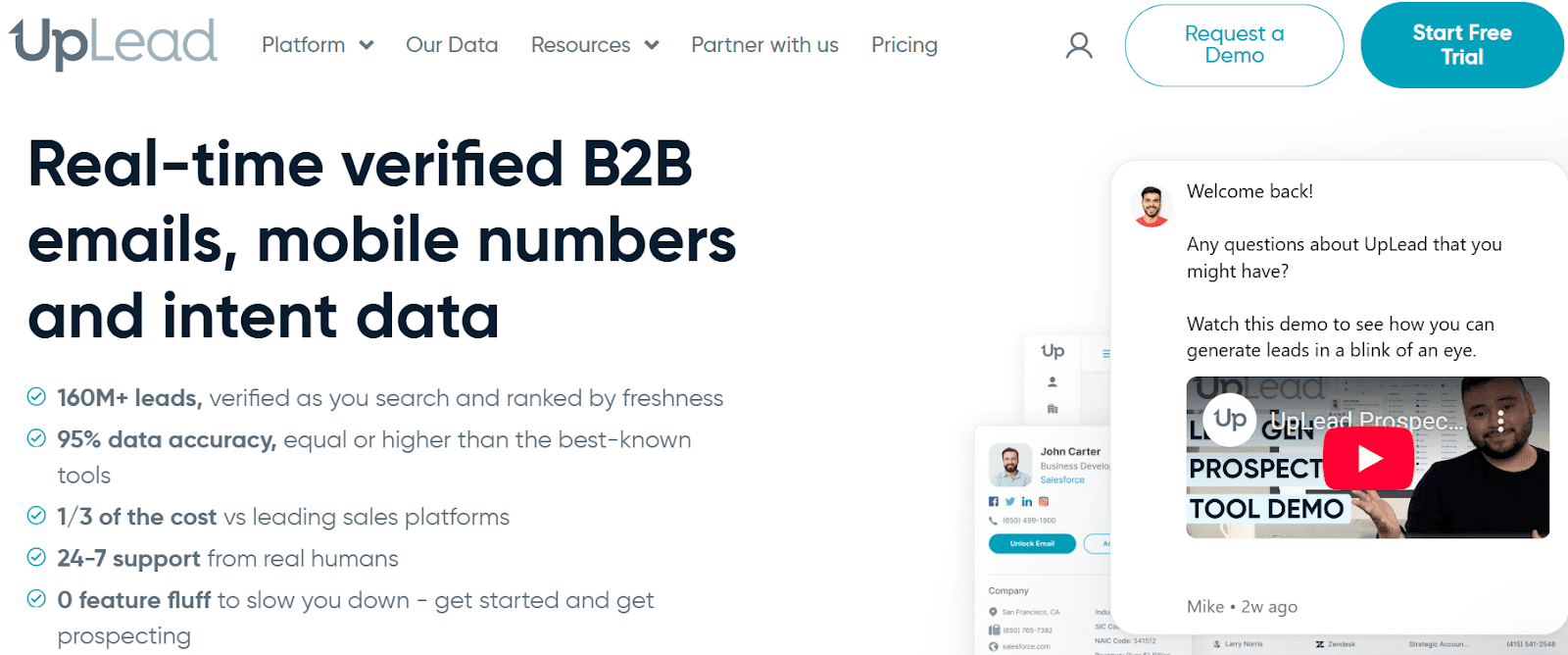
UpLead is a B2B data platform focused on real-time email/phone verification, with filters, technographics/intent, and integrations for easy handoff to your stack.
Key features
Real-time email verification at unlock/export with 95% accuracy guarantee; bad data gets credit refunds (“friendly credits”).
Coverage: 160M+ contacts, 19M+ companies; records ranked by freshness.
Prospector with 50+ filters (title, seniority, revenue, location, etc.).
Technographics: search by 27K+ tracked technologies.
Buyer intent data (with Bombora signals per docs) to prioritize in-market accounts.
Mobile & direct dials alongside emails.
Bulk Lookup: enrich thousands of leads at once with 40+ data points.
Data Enrichment: real-time enrichment into your CRM to avoid stale data.
Chrome extension to capture leads as you browse LinkedIn/websites.
API access for programmatic find/enrich/verify.
CRM & tool integrations (e.g., Salesforce, HubSpot; sync/export without CSVs).
Verification statuses shown (Valid / Invalid / Accept-All) at the moment of unlock/export.
Credit model that unlocks full contact (email + mobile); credits refunded on bounces.
Support & reliability: public claims of 24/7 human support and #1 G2 rating (4.7/5).
Pros
Real-time verification with a 95% accuracy guarantee and no charge for invalid emails → lowers bounces.
Good coverage + depth: ~160M+ contacts / 19M+ companies, 50+ filters, technographics (27K+ techs), and buyer intent.
Phones + emails in one unlock: one credit reveals the contact’s email and mobile/direct dial.
Smooth handoff: Chrome extension and CRM/API integrations to push leads directly into tools.
Operational rigor: real-time verification at download + manual research loop for invalids.
Cons
Credit caps by tier; heavy usage means moving up plans or buying add-ons.
Feature gating: technographics (Plus) and buyer intent + full API + bi-directional CRM (Professional) are on higher tiers.
Accept-All domains can’t be fully verified in real time (UpLead surfaces status but can’t confirm delivery).
Short trial: 7 days / 5 credits, limited for large tests.
Pricing
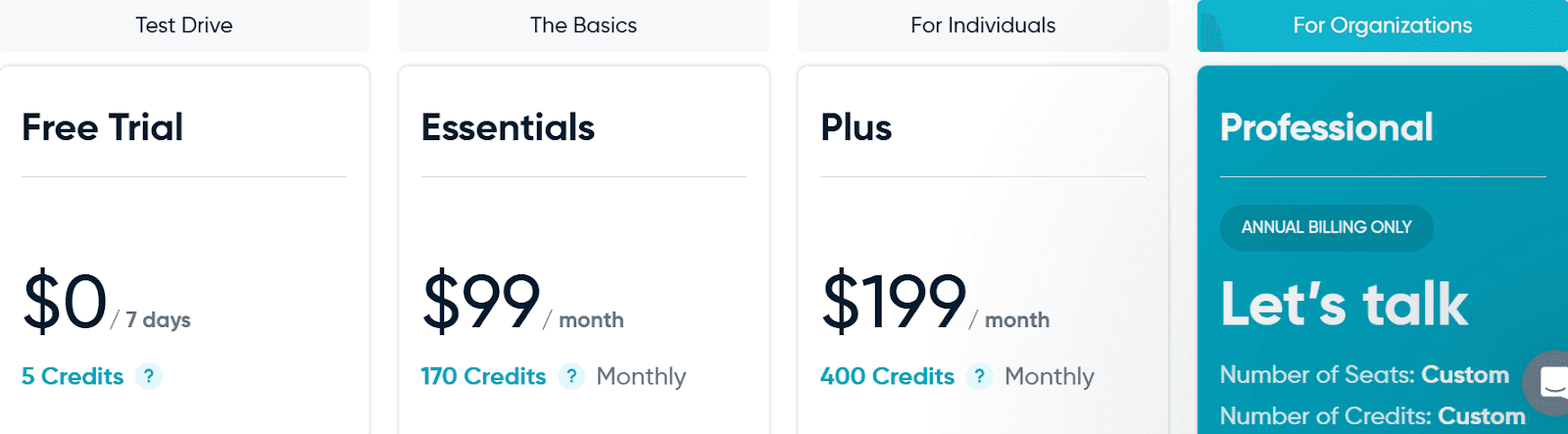
Free trial: 7 days, 5 credits.
Essentials: Listed as from $74/mo (annual) with a credit bundle.
Plus: Listed as from $149/mo (annual) with more credits.
Professional: Custom (adds buyer intent, full API, bi-directional CRM). Always verify current allowances on the pricing page.
Who should use it
Teams that want verified, low-bounce email/phone data with intent/technographics and API/CRM sync, without building a separate verification pipeline.
Notable proof points
Homepage: 160M+ contacts, 95% accuracy, real-time verification.
Features/tech pages: 50+ filters, 27K+ technographics, Chrome extension, API.
Pricing page: trial, tiers, credit definition.
#5. Lusha
Lusha is a contact and company data tool (popular Chrome extension) that reveals verified emails and direct dials, with options for intent signals and basic automations.
Key features
Discovery: Contact & company search, Chrome extension, buyer intent, signals & alerts.
Lead streaming: AI recommendations and “AI Prospect Playlists” (auto-updating lists).
Automations: Engage (email automation/personalization), Conversations (record/analyze meetings), automated prospecting.
Connected systems: MCP (stream Lusha data into tools), API, CRM & sales tool integrations, enrichment to keep CRM fresh.
Data scale & quality: ~280M+ contacts, verified emails, direct dials; public claims of 98% email deliverability and 85% phone accuracy.
Compliance: GDPR, CCPA, ISO certifications, SOC 2 Type II.
How Lusha compares to D7
Workflow: Lusha = discover → stream leads → automate outreach → enrich/sync. D7 = search by niche/location → export list.
Signals: Lusha adds buyer intent + alerts; D7 is list-first with no live signal stream.
Integrations: Lusha offers MCP, API, and native CRM/engagement integrations; D7 relies on exports.
Pricing model: Lusha uses credits per reveal (1 email, 5 phone) with multi-seat tiers; D7 uses daily search caps.
Pros
Strong phone coverage/accuracy with direct dials (useful for call-first teams).
Intent + alerts help prioritize in-market accounts.
Chrome extension for LinkedIn/web, quick capture.
Automations (Engage, playlists) reduce manual list work.
Integrations/API/MCP for clean CRM sync and custom workflows (Zapier, n8n, etc.).
Compliance posture (GDPR/CCPA/ISO/SOC2) for regulated buyers.
Lower entry price with multi-seat lower tiers and credit rollover.
Cons
Credit burn on phones (5 credits each) can add up for call-heavy teams.
Some features are tier-gated (e.g., higher playlist/intent limits, CSV enrichment rows, team controls).
If you only need large, generic business lists fast, a simple scrape-and-export tool may be quicker.
Still requires good targeting - signals help, but you’ll set criteria to get quality.
Pricing
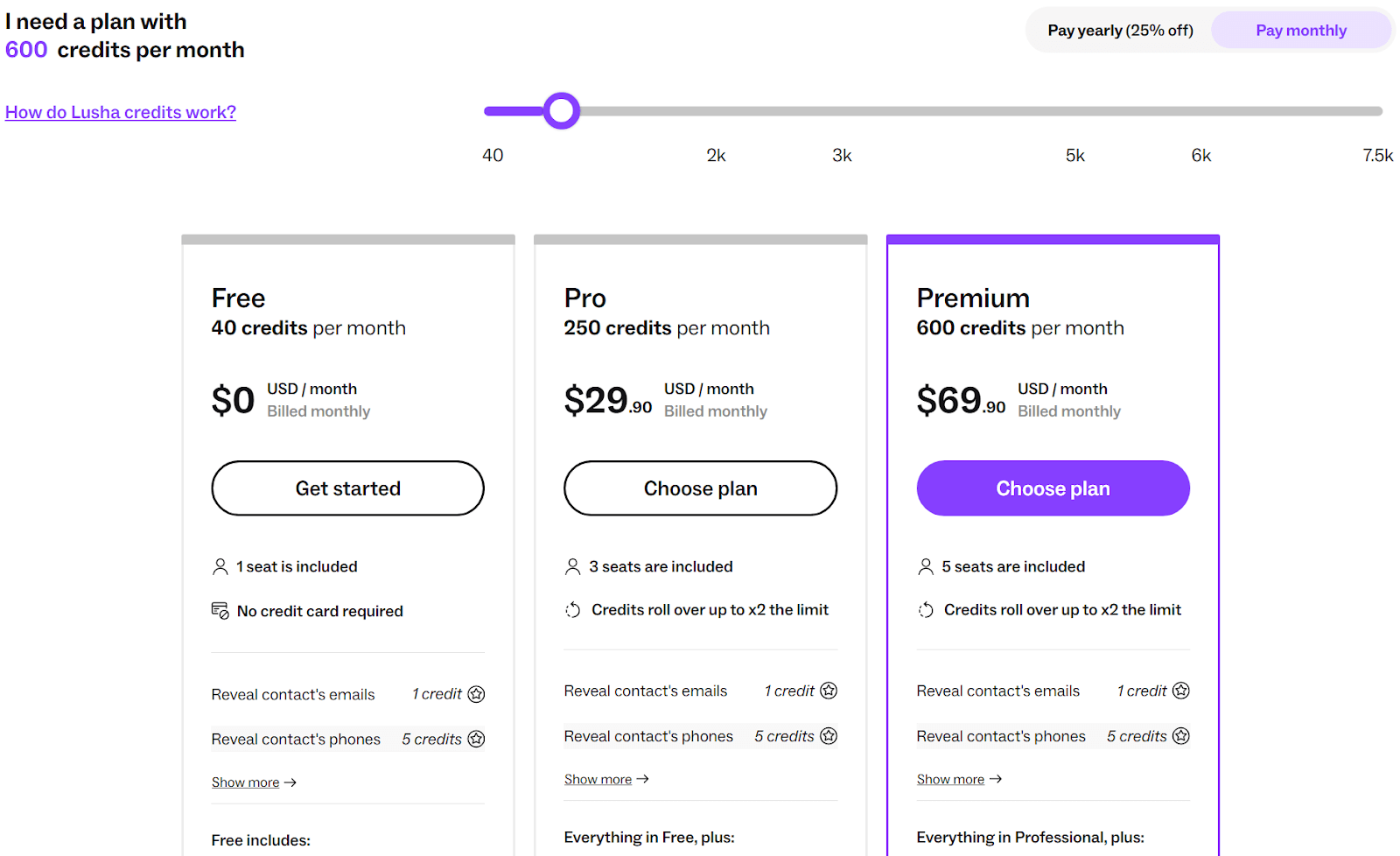
Free: 40 credits/mo, 1 seat. Emails=1 credit; phones=5. Includes extension, integrations, API, and basic intent.
Pro: 250 credits/mo, $29.90/mo, 3 seats, rollover up to 2×, CSV enrichment (to 300 rows), shared credit pool.
Premium: 600 credits/mo, $69.90/mo, 5 seats, more bulk/analytics, and larger enrichment limits.
Scale: Custom credits/seats; adds unlimited intent filter results, large CSV/bulk limits, team management, CSM, SSO, CRM enrichment.
Who should use it
SDRs/recruiters/sales teams that need fast, accurate emails + direct dials, buyer-intent signals, and in-tool automation with clean CRM sync - without stitching multiple products.
Notable proof points
~280M+ verified contacts with 98% email deliverability and 85% phone accuracy; GDPR/CCPA/ISO/SOC 2 Type II.
MCP/API + Chrome extension, AI Recommendations/Playlists, Engage; clear tiers (Free 40 credits, Pro 250 at $29.90, Premium 600 at $69.90; 1 credit/email, 5/phone).
Conclusion - Which is the best D7 Lead Finder Alternative?
Need timing + auto-personalization? Coldreach.
Need verified lists + easy CRM handoff? Leadsforge.
Want one platform for data + outreach? Apollo.io.
Prioritizing deliverability and clean data? UpLead.
Calling is your main motion? Lusha.o
Related Posts
Frequently Asked Questions
What are the best D7 Lead Finder alternatives?
The best D7 Lead Finder alternatives include Apollo, ZoomInfo, Cognism, Clay, and Coldreach. Coldreach is best when you need more than lead lists: it adds buying signals, research, personalized messaging, and outbound automation.
How do I choose a lead finder tool?
Start with the quality of the leads, then evaluate enrichment depth, export workflow, compliance, integrations, and whether the tool helps you turn data into conversations. Data alone is not enough if the outreach is generic.
How is Coldreach different from D7 Lead Finder?
D7 Lead Finder helps identify local business leads. Coldreach is built for B2B outbound teams that need signal-based account research and personalized outreach at scale.